Excel Automation for UK Businesses
Microsoft Excel is one of the most powerful tools any business of any size can use, yet one of the most underused. Combined with the rest of Microsoft 365 (Outlook, Word, Power Automate, Power Query) it becomes a genuine business operating system. CRMs, pricing tools, inventory databases, marketing workflows, sales pipelines. If your business already pays for Microsoft 365, you are already paying for the infrastructure to run most of your operations. You just need to know how to use it.
The Knowledge Gap
Most small businesses in the UK are paying for a Ferrari and driving it at 40 miles per hour.
Most small businesses in the UK have Microsoft 365. They are paying the subscription every month. And they are using Excel to keep basic lists, Outlook to send emails one at a time, and ignoring Power Automate entirely. Then they go out and spend thousands of pounds a year on separate CRM software, separate email automation tools, separate inventory systems, when their existing Microsoft subscription can already do most of it.
Microsoft does a poor job of explaining what their tools can actually do. Most people were never shown. That is where we come in.
What You Can Actually Do With Excel
Excel is not a spreadsheet application. It is a database, an automation engine, and a web-connected tool all at once. Here are a few of the things most businesses do not realise are possible.
Every time someone submits a lead capture form on your website, the information drops straight into a spreadsheet, automatically. No manual data entry, no copy-paste, no forgotten enquiries. Your leads live in one place, updated in real time, ready to be followed up or analysed.
If you receive dozens of similar emails a week such as sales orders, enquiries, bookings, invoices, etc. your inbox can extract the information from each one and populate a spreadsheet automatically. What used to take an afternoon of manual copying now happens in the background while you do something else.
You do not need to pay £40 per user per month for a CRM if you have fewer than 100 customers. A properly built Excel CRM connected to Outlook can track every lead, every conversation, and every follow-up, for free.
Daily, weekly, or monthly reports generated and emailed automatically. Sales summaries, inventory levels, stock movements, booking trends. Set it up once, forget about it, and it shows up in your inbox every Monday morning.
Case Study
Case Study
From Inbox Chaos to a Working Database
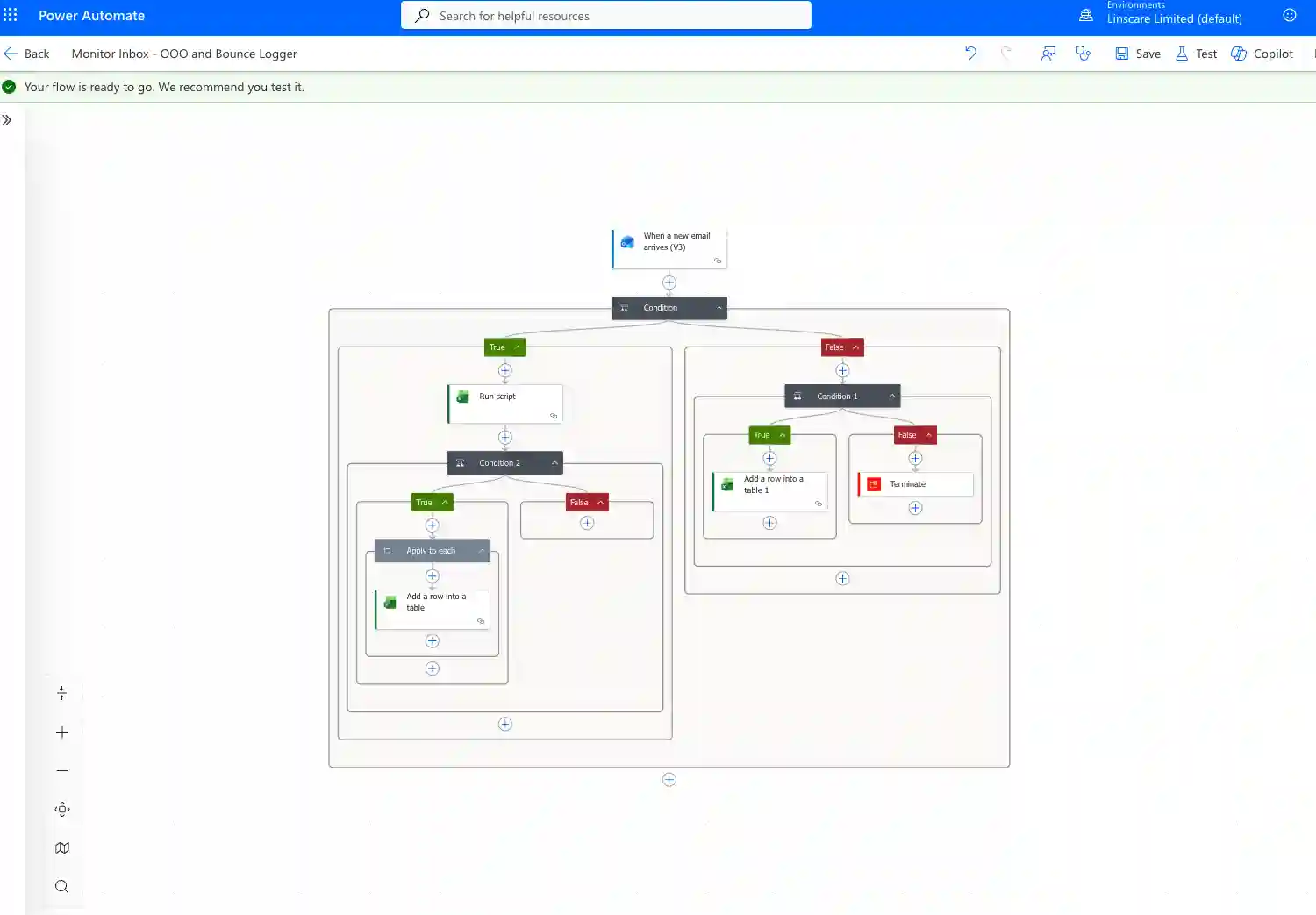
A client came to us with two problems. Their sales team was losing hours every week manually reviewing thousands of bounced and out-of-office email replies. And their contact database of over 16,000 records was a mess, inconsistent formats, missing names, duplicated emails, and no way to segment for marketing campaigns.
We built them a complete solution using nothing but Microsoft 365 and Excel. No third-party software, no subscriptions.
What we built:
- A live email monitor that scans their inbox 24/7, automatically detecting out-of-office replies and bounced emails
- Automatic extraction of new contact details from those replies, logged straight into a structured spreadsheet
- A retroactive scan that processed thousands of historical emails from their inbox and deleted items
- A cleaned and restructured contact database — 16,000+ records sorted into clean categories by team, region, and service type
- Smart duplicate detection that removed exact matches and flagged 1,432 similar records for human review
- A full reporting tab so the sales team could filter and export targeted contact lists in seconds
- A complete SOP document so that they can maintain the whole system themselves
Beyond Excel — The Full Microsoft 365 Ecosystem
Excel sits at the centre, but the real power comes from connecting it to the rest of your Microsoft tools. These are the outcomes we deliver most often for clients.
Behind the scenes we work with Outlook, Power Automate, Power Query, and Word — all included in your existing Microsoft 365 subscription.
The Process
Discovery
We understand your business, the tasks eating your time, and what you want to automate.
Proposal
We scope the work, estimate hours, and agree the approach before anything is built.
Test Build
We create a working prototype on a test data set and show you how it behaves.
Final Build
Once you are happy, we build the full system using your real data.
Handover
We deliver the completed system and walk you through how to use it.
SOP Documentation
You receive a written standard operating procedure — so if your staff changes, the knowledge stays with your business.
Pricing
We work on an hourly rate for Excel and Microsoft 365 projects because scope varies enormously. A basic website-to-Excel connection takes a few hours. A full CRM with automated email follow-ups takes longer. Rather than inflate our packages to cover every possibility, we quote honestly based on the work.
£99 per hour
For projects under 100 hours
- Full scope and cost agreed upfront — no surprise bills
- Includes discovery, build, testing, and SOP documentation
For projects over 100 hours
We agree a fixed project price after discovery. Larger projects typically come in at a better effective hourly rate.
For context, a typical working Excel CRM build takes 6–12 hours — meaning a fully automated system costs less than most businesses pay in a single month of equivalent software subscriptions. We always quote the full project before starting, so you know exactly what you are spending before any work begins.
Is This Right for Your Business?
This is for you if:
- You already pay for Microsoft 365
- You spend hours a week on repetitive admin tasks
- You are paying for separate software that duplicates what Excel can do
- You want to automate without replacing your existing systems
Do not use Microsoft 365? We offer general workflow automation services — Workflow Automation.
Frequently Asked Questions
Do I need to already have Microsoft 365?
Yes, for most of this work. If you do not, we will advise whether to subscribe or use a different approach.
Will this work with my existing spreadsheets?
Almost always. We start with what you have and build from there.
Do you train my team?
Yes — the SOP documentation and handover walkthrough are included in every project.
Can you maintain the system after handover?
Yes. Ongoing support is available under our website management rates if needed.
Can I cancel anytime?
There is nothing to cancel — projects are priced and delivered as one-off builds. Ongoing support is rolling monthly if you want it.
Ready to Take Control of Your Microsoft Tools?
Tell us what is eating your time. We will come back with a proper quote and a recommendation on the right approach.